Gameplay Guide
How to Play Narinig Mo Ba? Controls and Change Guide
Master store navigation, item handling, and change calculation to operate your sari-sari store in Narinig Mo Ba?
Quick Answer
Shift between five views using screen borders, left-click to handle goods, and deliver orders through the central window before returning exact change.
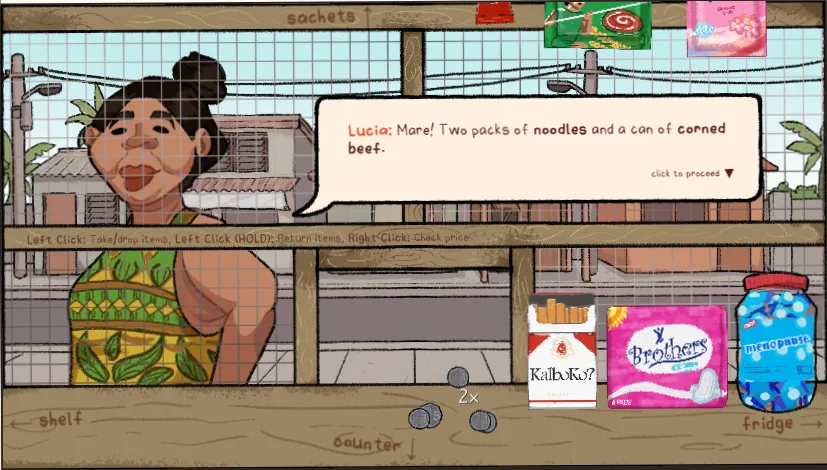
Narinig Mo Ba? Controls: Camera Navigation, Five Views, and WASD Status
Moving your cursor to screen edges shifts between five store perspectives: counter, overhead rack, left shelves, refrigerator, and cash drawer.
- Mouse edge panning is the primary documented control method.
- Physical WASD keyboard movement remains unverified in this build.
- Pick dialogue options first to restore camera rotation.
Read More
Camera movement locks only while a dialogue reply choice is actively awaiting selection. Choosing that response immediately clears the lock.
Checking Prices, Holding Items, and Returning Stock in Narinig Mo Ba?
Left-click picks up or places merchandise, while right-clicking a held product displays its single-unit price rather than a stack total.
- Candies and select items stack without order limits, while bottles, canned goods, and ice cannot stack.
- Customers reject oversized stacks as well as incorrect items.
Read More
To return held goods, hold left-click for at least 0.5 seconds at a matching and returnable shelf, then release. Not all matching shelves permit returns.
Passing Counter Goods Through the Central Opening and Transaction Order
Customers pay and display order icons before you deliver goods through the central serving window.
- Partial deliveries are accepted, but wrong items or quantities exceeding the remaining request are refused.
- Follow interface icons rather than dialogue, such as Rayder on Day 4 needing two waters for 40 pesos.
Read More
Stowing counter cash into the drawer is not required to unlock delivery, but placing items on dialogue bubbles fails.
Giving Exact Change Using the Cash Drawer in Narinig Mo Ba?
Calculate change by subtracting the fixed order total from the customer's actual cash payment.
- Any coin or banknote exceeding the remaining change owed is automatically rejected.
- Customer tender varies randomly; for example, Lucia's 58-peso Day 1 order returns 42 pesos change if paid with 100.
Read More
Exact payments require no change, and excess amounts are returned using matching drawer denominations until the balance reaches zero.
FAQ
01How do I switch between the five store views?
Move your mouse cursor to the edges of the screen to pan between the counter, overhead stock, left shelves, refrigerator, and cash drawer. Note that customer dialogue temporarily locks your view until you select a response.
02Why did a customer reject my items or change?
The customer rejects items if they are the wrong product or if a stack exceeds the requested quantity, and also rejects any money that exceeds the remaining change due.
03How do I check item prices in the shop?
Left-click to pick up an item, then right-click while holding it to inspect its unit price. Right-clicking shows the price for one unit, not a combined stack.
04What should I do if dialogue contradicts the order bubble?
Always follow the visual order icons and counts shown on screen. Spoken lines, like Rayder asking for one bottle of water on Day 4, do not replace the actual two-bottle requirement.